Showing posts with label new app. Show all posts

Sunday, 6 April 2014

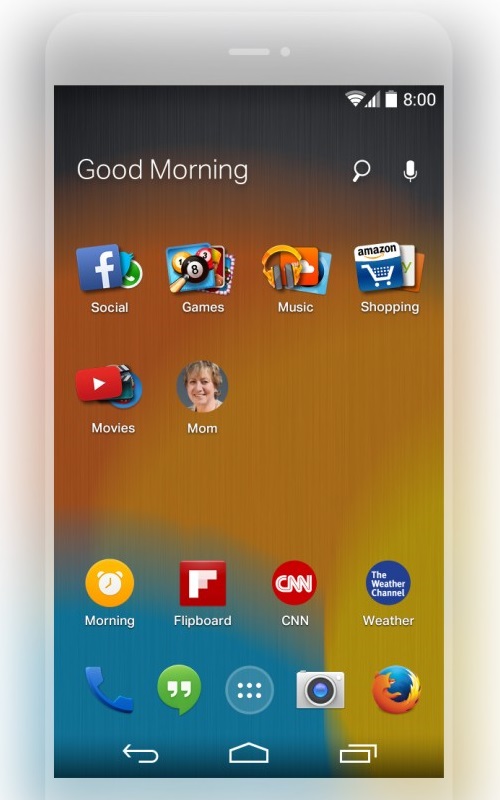
Mozilla previews Firefox Launcher for Android with adaptive app search from EverythingMe

Mozilla previews Firefox Launcher for Android with adaptive app search from EverythingMe

EverythingMe

Mozilla previews Firefox Launcher for Android with adaptive app search from EverythingMe

Mozilla previews Firefox Launcher for Android with adaptive app search from EverythingMe

EverythingMe

Saturday, 22 March 2014

Samsung's Galaxy S5 Experience app


Samsung's Galaxy S5 Experience app lets you see some S5 features on your Nexus, Xperia, or another Android phone

Samsung's Galaxy S5 Experience app lets you see some S5 features on your Nexus, Xperia, or another Android phone
As of today, March 21, Samsung is allowing customers to try out the Galaxy S5 in various stores in select markets (starting with the US and Switzerland). However, in case you can’t visit a store that has the S5 on display, Samsung launched a Galaxy S5 Experience app that “provides interactive introduction on Galaxy S5 and Wearable Devices.”

Don’t expect the app to work as if you’re actually playing with a real Galaxy S5. This is merely a walkthrough of the main features that you’ll find on the new smartphone, including its camera, the S Health app, the Ultra Power battery saving mode, and so on. The app may appear a bit buggy, with flattened buttons in some cases - as it did on one of our Nexus 4 handsets (you can see that in the gallery below).

You can download the Samsung Galaxy S5 Experience app at the Google Play link found at the end of this article. You need to have a smartphone running Android 4.0 or later, with a screen resolution of at least 480 x 800 pixels, plus 1GB of RAM and a 1.0GHz processor. The app does not work on tablets.

Samsung will officially launch the new Galaxy S5 starting April 11 in lots of countries around the world.

Samsung's Galaxy S5 Experience app


Samsung's Galaxy S5 Experience app lets you see some S5 features on your Nexus, Xperia, or another Android phone

Samsung's Galaxy S5 Experience app lets you see some S5 features on your Nexus, Xperia, or another Android phone
As of today, March 21, Samsung is allowing customers to try out the Galaxy S5 in various stores in select markets (starting with the US and Switzerland). However, in case you can’t visit a store that has the S5 on display, Samsung launched a Galaxy S5 Experience app that “provides interactive introduction on Galaxy S5 and Wearable Devices.”

Don’t expect the app to work as if you’re actually playing with a real Galaxy S5. This is merely a walkthrough of the main features that you’ll find on the new smartphone, including its camera, the S Health app, the Ultra Power battery saving mode, and so on. The app may appear a bit buggy, with flattened buttons in some cases - as it did on one of our Nexus 4 handsets (you can see that in the gallery below).

You can download the Samsung Galaxy S5 Experience app at the Google Play link found at the end of this article. You need to have a smartphone running Android 4.0 or later, with a screen resolution of at least 480 x 800 pixels, plus 1GB of RAM and a 1.0GHz processor. The app does not work on tablets.

Samsung will officially launch the new Galaxy S5 starting April 11 in lots of countries around the world.

Wendy's app

Wendy's app now allows you to pay online

Wendy's app now allows you to pay online
Wendy's is using its mobile app in an effort to attract young, smartphone obsessed youngsters. You've seen these kids. They are the ones walking into the restaurant with their heads down, staring at the screens in front of them, even while eating. To make dining at the fast food establishment a lot more convenient, Wendy's has a mobile payments feature on its app that is available at many (but not all) Wendy's locations. Just the other day, Burger King announced that it would be extending the reach of its mobile payment app to 7000 stores from just a handful.

But Wendy's left out the most important part of offering an app in the first place. There are no coupons, discounts or deals, something that the BK app is chock-full of. Where it does copy its rival's app is with the mobile payments and the nutritional value chart which tells you that a triple everything with cheese is an artery-clogging 1030 calories.  Tapping the app will provide you with a numeric code that you repeat to the cashier when it comes time to pay for your meal. That is similar to how Burger King is handling mobile payments on its app.

The My Wendy's app is available from both iTunes and the Google Play Store, and will probably be a welcome addition to your app drawer once the hot weather arrives and a nice cold Frosty is just what you need to cool off.

Screenshots of the My Wendy's app

Wendy's app

Wendy's app now allows you to pay online

Wendy's app now allows you to pay online
Wendy's is using its mobile app in an effort to attract young, smartphone obsessed youngsters. You've seen these kids. They are the ones walking into the restaurant with their heads down, staring at the screens in front of them, even while eating. To make dining at the fast food establishment a lot more convenient, Wendy's has a mobile payments feature on its app that is available at many (but not all) Wendy's locations. Just the other day, Burger King announced that it would be extending the reach of its mobile payment app to 7000 stores from just a handful.

But Wendy's left out the most important part of offering an app in the first place. There are no coupons, discounts or deals, something that the BK app is chock-full of. Where it does copy its rival's app is with the mobile payments and the nutritional value chart which tells you that a triple everything with cheese is an artery-clogging 1030 calories.  Tapping the app will provide you with a numeric code that you repeat to the cashier when it comes time to pay for your meal. That is similar to how Burger King is handling mobile payments on its app.

The My Wendy's app is available from both iTunes and the Google Play Store, and will probably be a welcome addition to your app drawer once the hot weather arrives and a nice cold Frosty is just what you need to cool off.

Screenshots of the My Wendy's app

Thursday, 13 March 2014

YouTube 5.5 for Android

YouTube 5.5 for Android brings better search, new tabs on pages and more


Google has updated YouTube app for Android to version 5.5.27, that brings some features such as better search results, that now shows videos, playlists and channels, new tabs such as activity, videos and playlists on a channel and some bugfixes related to Google Cast. This version also has a range of improvements.
As noted by Android Police, the new version also has UI tweaks, option to reply to comments, playlist overview page shows information, thumbs-up, share and delete. The app’s code also hints at new survey, just like ads and offline-related strings for option to store offline content to an SD card. Google released the version 5.5.26 meant for internal testing, with features such as dogfood settings screen with ExoPlayer, but it was soon updated to 5.5.27, removing these features. Check out the official changelog below.
New features in YouTube v5.5.27 for Android
  • Find videos, playlists and channels together in search results
  • Tabs on channel pages, for activity, videos and playlists
  • Various bug fixes and improvements, notably a fix for the Cast icon appearing over the player when Bluetooth is connected
Get the latest version of YouTube for Android from the Google Play.

YouTube 5.5 for Android

YouTube 5.5 for Android brings better search, new tabs on pages and more


Google has updated YouTube app for Android to version 5.5.27, that brings some features such as better search results, that now shows videos, playlists and channels, new tabs such as activity, videos and playlists on a channel and some bugfixes related to Google Cast. This version also has a range of improvements.
As noted by Android Police, the new version also has UI tweaks, option to reply to comments, playlist overview page shows information, thumbs-up, share and delete. The app’s code also hints at new survey, just like ads and offline-related strings for option to store offline content to an SD card. Google released the version 5.5.26 meant for internal testing, with features such as dogfood settings screen with ExoPlayer, but it was soon updated to 5.5.27, removing these features. Check out the official changelog below.
New features in YouTube v5.5.27 for Android
  • Find videos, playlists and channels together in search results
  • Tabs on channel pages, for activity, videos and playlists
  • Various bug fixes and improvements, notably a fix for the Cast icon appearing over the player when Bluetooth is connected
Get the latest version of YouTube for Android from the Google Play.

Friday, 7 March 2014

WeChat new ui for Android

WeChat for Android
WeChat for Android has been update to version 5.2, that brings a lot of new features, including a new user interface, Real-Time location sharing, so that you can help your friends navigate their way on the WeChat map and through an integrated walkie-talkie session, option to search chat history with Android’s universal Search feature and more.
New features in WeChat 5.2 for Android
  • Redesigned faster and lighter WeChat for Android!
  • Real-time location sharing with walkie talkie
  • Universal search including chat history search
  • Receive a special notification if you’re mentioned in a group chat
  • Share sticker sets with friends
  • Link and show your LinkedIn account
  • Better image browsing in chats
  • Update friends’ profiles with photos, addresses and business cards
  • Calls connect more reliably and video and audio quality is improved
This update also brings some minor features such as, double tap on any chat message for a bigger view, press and hold “Camera” button to put “text” in moments.
Download WeChat (Free) – Android

WeChat new ui for Android

WeChat for Android
WeChat for Android has been update to version 5.2, that brings a lot of new features, including a new user interface, Real-Time location sharing, so that you can help your friends navigate their way on the WeChat map and through an integrated walkie-talkie session, option to search chat history with Android’s universal Search feature and more.
New features in WeChat 5.2 for Android
  • Redesigned faster and lighter WeChat for Android!
  • Real-time location sharing with walkie talkie
  • Universal search including chat history search
  • Receive a special notification if you’re mentioned in a group chat
  • Share sticker sets with friends
  • Link and show your LinkedIn account
  • Better image browsing in chats
  • Update friends’ profiles with photos, addresses and business cards
  • Calls connect more reliably and video and audio quality is improved
This update also brings some minor features such as, double tap on any chat message for a bigger view, press and hold “Camera” button to put “text” in moments.
Download WeChat (Free) – Android

 
Don't Forget To Join With Our Community
x
+Get this at Pc Tools Tips
Read more: http://pctoolstips.blogspot.com/2013/09/add-stylish-facebook-like-box-sliderpop.html#ixzz2yn1tdVQ2